原文核对:2026-10-13 · 中文正文 · 英文提示词与演示
场景定位
用 NGS Analysis 将 10x 风格矩阵包转成 QC 过滤结果、带阈值依据的摘要、注释和 UMAP,并在同一对话中审阅调整。
- 难度
- 中级
- 时间跨度
- 1 小时
适合用于
- 计数完成后进行矩阵级 QC、注释和可视化的单细胞团队。
- 需要阈值依据及移除、标记细胞审计记录的研究人员。
- 需要图像、可视化索引与 notebook 或应用交接的团队。
相关工具
执行单细胞计数后 QC,返回过滤、可视化、注释和 notebook 产物。
NGS Analysis ↗起步提示词
英文原文 · 可复制后按实际材料修改
Use the NGS Analysis plugin.

Route this matrix-level input to scrna-seq-qc using the indicated 10x-style matrix bundle, plus the manifest and dataset metadata.

Choose QC thresholds from the observed distributions, preserve raw counts, and generate global/per-group UMAPs.

Return:
- summary.md
- a QC summary table with cells removed or flagged per filter
- threshold-justification plots
- filtered .h5ad
使用技能
NGS Analysis 插件包含:
- 技能 ngs-analysis-router。
- 技能 scrna-seq-qc。
- 技能 ngs-scrna-seq。
使用插件时可调用这些内置技能。
操作步骤
- 提供矩阵、barcodes、genes/features、manifest 和数据集元信息,或准确文件引用。
- 运行起步提示词,根据实际分布选择 QC 阈值,并在产物中记录理由。
- 打开可视化索引及 notebook 或应用,检查 QC 通过/失败数量、UMAP 和注释置信度。
- 在同一对话中调整阈值、提供匹配参考图谱,或排除 doublet detection 阻碍后重跑。
结果
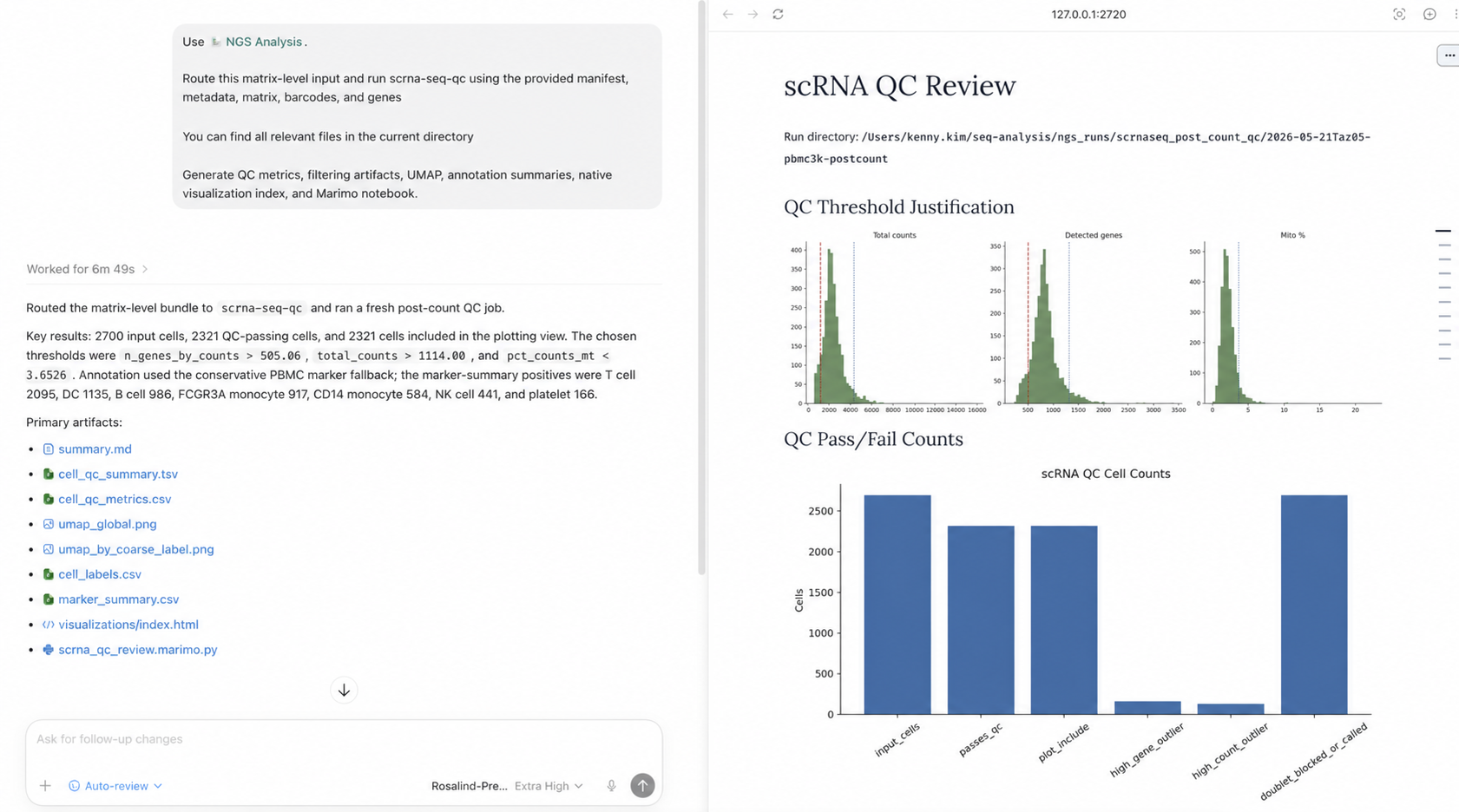
结果包含过滤决策审阅材料,不只是矩阵。先查看阈值依据图和 QC 摘要,确认各过滤条件移除或标记了多少细胞,以及阈值是否符合实际分布。
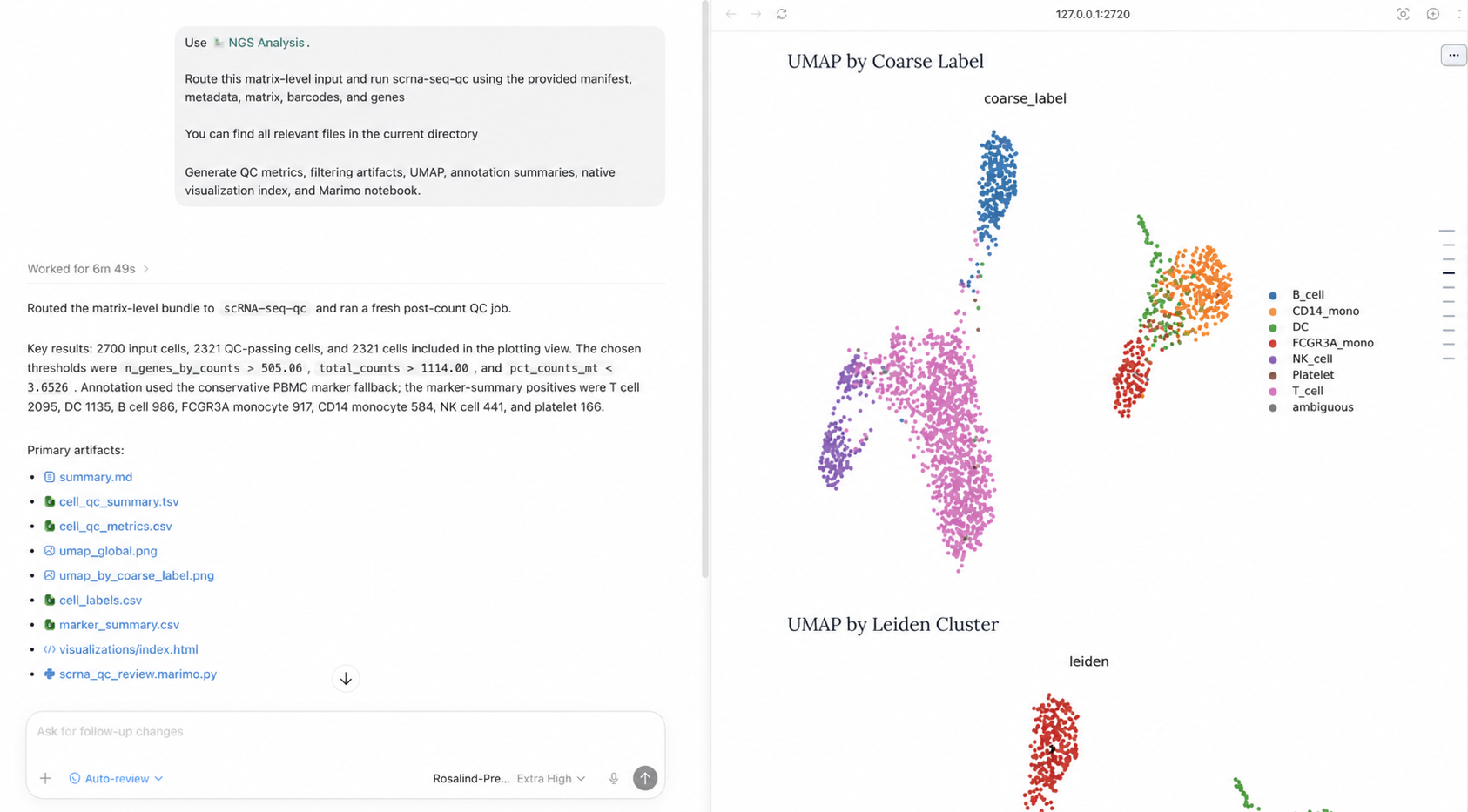
再查看按粗粒度标签和 Leiden cluster 着色的 UMAP,发现注释缺口、可疑簇或需调整的阈值。
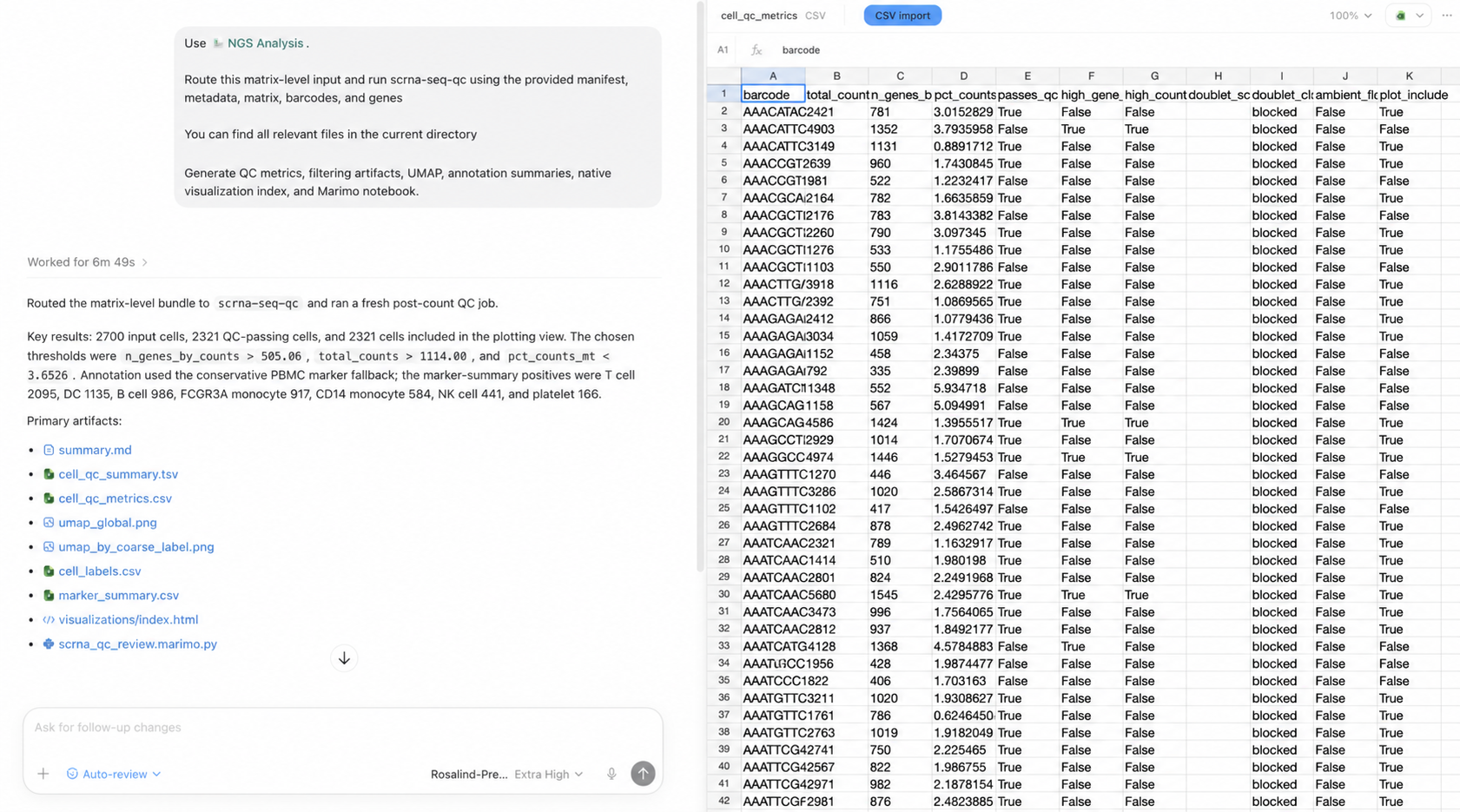
最后检查细胞级指标和过滤结果。该表与过滤后的 .h5ad、可视化产物一起保留,便于同一对话中修改阈值而不丢失首轮依据。
展开英文原文对照
Use ChatGPT with the NGS Analysis plugin to turn a 10x-style matrix bundle into QC-filtered single-cell artifacts, threshold-justified filtering summaries, annotations, and UMAPs you can inspect and revise in the same chat.
Leverage skills
The NGS Analysis plugin includes:
- ngs-analysis-router
- scrna-seq-qc
- ngs-scrna-seq
When you use the plugin, ChatGPT can use all these packaged skills.
Step-by-step guide
- Point ChatGPT to the appropriate matrix, barcodes, genes or features, manifest, and dataset metadata, or provide exact file references.
- Run the starter prompt so ChatGPT can choose QC thresholds from the observed distributions and record the rationale in the run artifacts.
- Open the visualization index and review notebook or app to inspect QC pass or fail counts, UMAPs, and annotation confidence.
- Continue in the same chat to refine thresholds, supply a matched reference atlas, or rerun after unblocking doublet detection.
Results
The run produces a review surface for the filtering decisions, not just a filtered matrix. Begin with the threshold-justification plots and the QC summary so you can see how many cells each filter removed or flagged and whether the selected cutoffs match the observed distributions.
Then inspect the generated UMAPs by coarse label and Leiden cluster. These views make it easier to identify annotation gaps, suspicious clusters, or threshold choices that need another pass.
Finally, review the cell-level metrics and filtering outcomes. ChatGPT preserves this table with the filtered .h5ad and visualization artifacts so you can revise the thresholds in the same chat without losing the rationale for the first pass.